Hold ⌃Space. Talk. Post.
Hold the button. Talk for 40 seconds. Hyperclip makes the video and writes the post for every platform. You paste. Done. Post from your Mac or your phone — doesn’t matter, same clip, same captions.
Like Gary Vee with no editor, no team, no excuses.
macOS · runs on your Claude Code sub · free right now
Where you’re going.
Same sub you already use to code. Now it cuts your video, writes your captions, and drafts the post for every platform. No new AI bill, no new login, nothing leaves your Mac.
One button. One post.
Hold the hotkey. Talk. Let go. You have a video. No editor, no timeline, no thinking.
We write every caption.
TikTok. Reels. Shorts. X. LinkedIn. Hyperclip writes the post for each one. You paste. Move on.
Post from desktop or phone.
Same clip, same captions, ready on your Mac and in your pocket. Grab whichever is in your hand and post.
Everything you need, on one screen.
The video. The captions. The hook. Pick what you like. Paste it. You’re done.
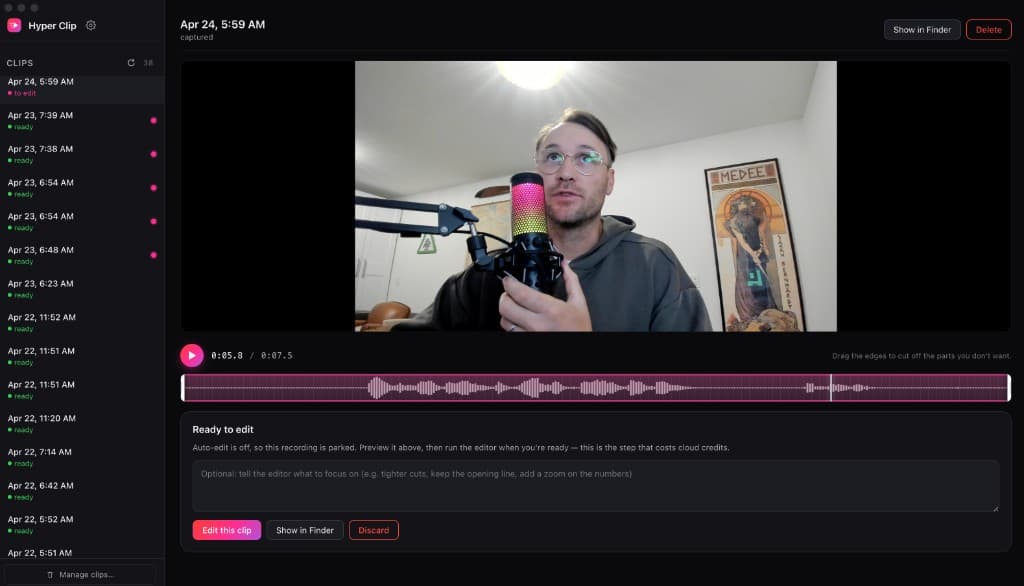

Two minutes, one clip, five platforms.
You see a headline. You hold the hotkey and talk at it for 40 seconds. You let go.
Your face, the screen, the captions — all there. Five posts already written. Pick the hook you like.
TikTok. Reels. Shorts. X. LinkedIn. That’s one done. Do the next one after coffee.
Download it. Hit the button. Post.
Drop your email. Install the app. Paste two keys. Hold the hotkey and talk. You’re posting on five platforms before your next meeting.
What does Hyperclip actually do?
Hold a hotkey and talk through your idea. It records your face cam and screen at the same time, cuts out dead air and ums, burns in captions, and drafts post copy for TikTok, Reels, Shorts, X, and LinkedIn. You pick the best take. You paste.
How much is it?
Free right now. You bring a Claude Code subscription (it does the edit and writes the captions) and an ElevenLabs API key for voice — Hyperclip itself has no price tag today. That may change later; early users get a heads-up before it does.
Does it auto-post to the platforms?
No. It hands you the file and the copy per platform. You paste. The gap is on purpose — you get one last look before it goes live.
What do I need to run it?
A Mac, a Claude Code subscription, and an ElevenLabs API key. Point Hyperclip at them once and the hotkey works forever.
Is the growth chart real?
It is a shape, not a guarantee. Compounding like that needs you to actually post — Hyperclip removes the editing bottleneck that usually stops you from posting enough to find out.
Why ask for email before download?
Keeps the release list clean and lets Andrew tell real users when the product changes. No spam, no drip sequence.